
Your whole business in one system.
Accounting, sales, purchasing, inventory, projects and document approval – in one modern system that runs in your browser and as an app on Windows, Mac and Linux. Built on decades of proven ERP know-how from Kompas4 and redesigned for the way you work today.
- 10integrated modules
- 100+ready-made reports and 150+ print layouts
- 2languages – English and Danish
- 21themes – light and dark
- Several companieswith one login – each with its own database
- Web + appin your browser and on Windows, Mac and Linux
Accounting and general ledger
Keep your books accurate, up to date and audit-ready.
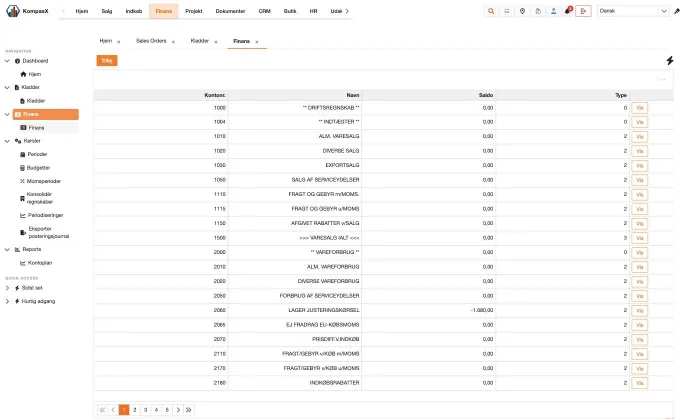
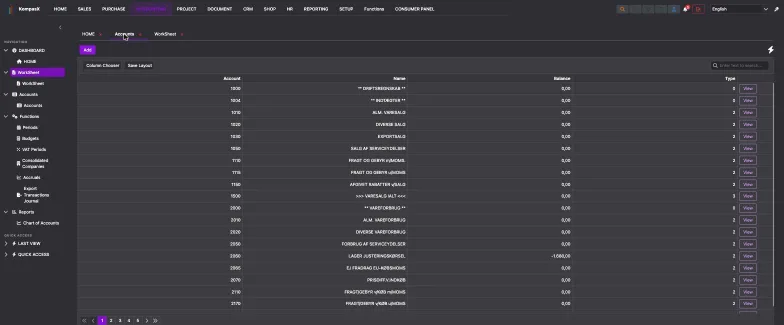
Chart of accounts
- Clear, searchable chart of accounts with a flexible column picker – VAT, currency, dimensions, report codes, consolidation and SAF-T accounts, and more
- Create accounts manually or from ready-made standard templates
- Every account card shows period balances, full transaction history with running balance, open and settled items, and linked documents
- Automatic distribution – split amounts by percentage across accounts and dimensions
Journals and cash book
- Multiple named journals, each with its own defaults and setup
- Fast entry grid with debit/credit, offset account, VAT, currency and rate, quantity, dimensions, due date and cash discount
- Check before you post – errors and warnings are highlighted, and you can jump straight to the next error
- Simulate posting – preview the resulting balances before anything is committed
- Recurring journals, voucher series, open-item settlement inside the journal and one-click reversal of transactions
Show all 7 items
- Journal archive – browse every posted batch, reprint it, or copy or reverse it back into a journal
- Journal locking shows who is working in a journal, so no one overwrites anyone else's work
Balance sheet and analysis
- Seven built-in views: actuals this year and last year, budget, actual vs. budget, this year vs. last year, this year with budget vs. last year, and year-to-date
- Slice everything by department, cost centre, project and purpose
- Switch fiscal years instantly
Budgets
- As many budgets as you need – activate the one you want to measure against
- Enter budgets by month, quarter or half-year, per dimension
- Copy an existing budget, or start from last year's actuals
Periods, VAT periods and year-end
- Open, block or close accounting periods, with remarks
- Create new fiscal years and run the year-end transfer, with optional distribution
- Manage VAT period ranges and open or close VAT periods
Advanced finance
- Accruals – collect and post accrual entries for any date range
- Group consolidation – consolidate multiple companies with a rate and ownership percentage per company
- Currency revaluation – revalue foreign-currency balances for customers and suppliers
- Transactions journal export – to file or by email as PDF or Excel
Maintenance tools
- Recalculate balances for accounts, customers, suppliers, stock, and sales and purchase orders
- System check that finds any audit trails that don't balance
- Renumber or merge key numbers such as account and customer numbers – the history moves with them
- Compress old transactions up to a closed period
- Release locked records and view program status
Customers and receivables
Know every customer – and get paid faster.
Customer cards
- Complete customer profile: general details, terms and setup, delivery addresses, optional fields, webshop login and more
- Contacts and contact log – every person and every conversation in one place
- Documents – attach contracts, correspondence and files directly to the customer
- Customer-specific discounts – percentage, fixed price or per-unit discount, quantity breaks, validity dates, weekday rules, invoice discounts and cash discounts
- Credit limits and blocking, with warnings when entering orders
Instant customer insight
- Aged balance – in 30/60/90+ day buckets, by due date or transaction date
- Balance by period, full transaction history and every document printed for a transaction
- Sales history and profit statistics by period or item
- All the customer's orders, quotes and subscriptions – create a new order right from the card
- Customer account statements with open or all items, printed or emailed
Collections and settlement
- Open-item matching – match payments to invoices, settle and undo
- Reminder runs – up to four reminder levels with fees, waiting days and optional automatic blocking; print or email the letters and post the fees
- Interest notes – calculate interest on overdue balances, preview, print or email, then post
- Mass settlement and write-off of small balances
- Customer payment journal with check, simulate and post – plus a full archive
Sales, quotes and subscriptions
From first quote to final invoice – without re-typing a thing.
Four order types in one module
- Sales orders, cash sales, subscription orders and quotations
- Turn a quotation into an order with one click
- The full document flow: quotation → order confirmation → pick list → delivery note → invoice → credit note
- Preview before you post, or post and print in one step
Powerful order entry
- Over 30 line tools: copy and compress lines, text and subtotal lines, allocate stock, check availability, price and cost-price history, global line discount, sort lines, split and merge orders, expanded bills of materials and more
- Smart safeguards – credit-limit and blocked-customer warnings, back-order prompts and serial-number validation
- Change the price list or delivery date on the header, and KompasX offers to update every line
- Create purchase orders directly from sales lines
- Create or link a project straight from an order
Show all 7 items
- Returned goods and rental items
- Attach documents and product images to orders
Subscriptions and recurring billing
- Daily, weekly, monthly, yearly or weekday-based invoicing schedules
- Next invoice date and end date are calculated automatically
- Invoice all due subscriptions in one run – including by direct debit (Betalingsservice/PBS)
- Index adjustment – adjust subscription and price-list prices by an index
Batch processing – hours of work in seconds
- Run confirmations, pick lists, delivery notes, invoices or direct debit invoices across many orders at once
- Filter by customer, status, date and more – and email documents where possible
- Update orders when customer data changes, re-price open order lines, copy an order to many customers, process back orders and merge orders
Picking and delivery
- Order worksheet – pick lines across orders, expand bills of materials and complete deliveries with a packing slip
- Carrier integration – generate booking files for DPD DELISprint, PCPack, WinEDI, Consigner, Danske Fragtmænd and more
Email documents straight from KompasX
- Send quotes, confirmations, invoices and other documents as PDF, Excel or Rich Text
- Add your own subject, message, email signature and extra attachments
- Invoice archive – reprint, copy into a new order, credit or re-invoice at any time
Inventory and items
Always know what you have, where it is and what it's worth.
Item cards
- Complete item information: general details, setup, optional fields, parameters (variants) and notes
- Prices – multiple sales and purchase price lists, quantity breaks and markups
- Webshop data – URL, title, meta tags and internet groups
- Documents, images, customer and supplier item numbers, related items and inventory budget
Stock control
- Stock on hand by location – min/max levels, order size, available quantity, bin placement and last-counted date
- Move stock between locations
- Full serial-number traceability from purchase to sale
- Open order and purchase lines per item, plus purchase and sales statistics
- Duty and excise rules per item
Bills of materials and production
- Build multi-level bills of materials
- See where each component is used
- Production – produce from a bill of materials, print production orders and missing-item lists, or run batch production
Stock worksheets and counting
- Stock receipt/issue worksheet and location-move worksheet, with archive
- Inventory count – pull items by filter, print count sheets, count per location and post the differences with automatic account adjustments
Pricing and valuation
- Adjust stock value by FIFO, last purchase price and other methods
- Mass-update sales prices with rounding rules
- Adjust price lists in bulk
Intrastat
- Select a period, review and include or exclude entries, print, and create the Intrastat file
Suppliers and purchasing
Buy smarter, pay on time, never run out.
Supplier cards
- Full supplier profile with setup, purchase discounts, contacts, contact log, documents and optional fields
- Aged balance, period balances, transaction history and open items
- All purchases, invoices and credit notes per supplier, plus purchase statistics
- Supplier account statements
Purchase orders
- The complete purchase flow: inquiry → requisition → goods receipt → supplier invoice → credit note
- Up to three approval levels on each purchase
- EDI communication fields and payment ID
- Split and merge purchases, return goods and copy purchase lines to a sales order
- Attach documents to purchases
Automatic purchase proposals
- Generate purchases from minimum and maximum stock levels – review the proposal, set suppliers and create the purchase orders in one go
Payables and payments
- Supplier invoice and payment journal with check, simulate, post and archive
- Approve invoices for payment, place items on hold and transfer due payments to a payment journal
- Print payment cheques
- Supplier open-item settlement, mass settlement, small-balance write-off and currency revaluation
Projects and time
Run profitable projects – from budget to final invoice.
Project cards
- Project details, delivery information, sub-projects, documents and contact log
- Budgets per cost centre – copy budgets between projects
- Markup and discount per cost centre, with automatic update of project sales prices
- See all open order, purchase and journal lines linked to the project
Invoicing
- Invoice from project lines – on account, in arrears or from a quotation
- Compress material and labour lines on the invoice
- Retrieve invoices and credit notes from the archive
Control and insight
- Budget vs. actual per cost centre, including sub-projects
- Project balance sheet
- Three-level statistics summarised by day, week, month or year
- Gantt chart, budget control, key figures and post-calculation reports
Time and material registration
- Project worksheet for hours and materials, with check, post, recurring entries and archive
- Create purchases for a project, and create projects straight from sales orders
- Activate, deactivate or clean up closed projects in bulk
Employees
- Employee cards with cost and sales prices per item and cost centre
- Standard hours – hours per weekday and employment period
- Each employee's project lines and statistics per project, by day, week, month or year
- Employee transaction and price reports
Documents, inbox and approval flows
Paperless bookkeeping – from email to approved entry.
Automatic document inbox
- Connect your Gmail or Outlook/Microsoft 365 mailbox with secure sign-in – no password is stored
- PDF attachments are imported automatically into a shared inbox, with duplicates skipped
- Or simply upload documents yourself
- See sender, subject, email text and page count at a glance; mark as urgent, download, print or delete
Built-in PDF tools
- Split documents into single pages, by page range or at a chosen page
- Extract a page into a new document
Book straight from the document
- The PDF viewer sits right next to a posting panel
- Attach the document to existing entries, or create new entry lines directly from it – ledger, customer or supplier, with VAT, currency and offset account
- “Attach & approve” in a single step
Approval workflows
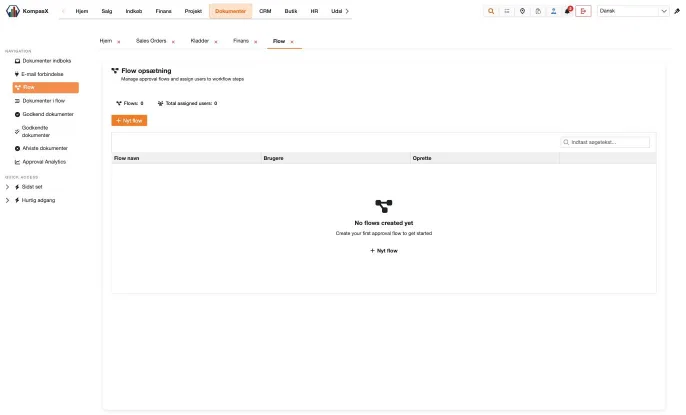
- Create named approval flows with approvers in order – just drag to rearrange
- Each approver has their own list of documents to approve, approves or rejects with notes, and sees the full history
- Automatic email notifications tell the next approver it's their turn and tell the submitter when the document is fully approved
- Separate lists for documents in progress, approved and rejected; rejected documents can be reassigned
Approval analytics
- Average approval cycle time, fastest flow, slowest approver, on-time rate and response times
- Charts per flow and a table per approver
- Filter by the last 30 days, the last 90 days or this year
Documents everywhere
- Attach files to customers, suppliers, items, sales orders and purchase orders – organised in document groups and stored securely online
- Every document printed for an entry is archived and can be reopened from the transaction
Reporting and insight
The numbers you need, when you need them.
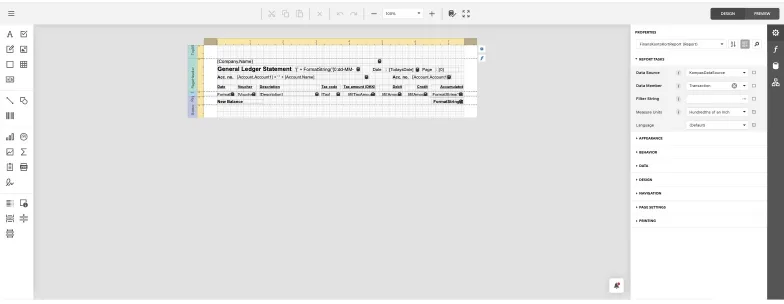
General ledger (16 reports)
- Chart of accounts
- G/L entries
- Balance
- Balance year-to-date vs. budget
- Balance vs. last year
Show all 9 items
- Department and project balance
- Budget control
- 12-month budget overview
- 2-year balance development
Customers (19 reports)
- Customer list and labels
- Reminder list
- Customer transactions
- Aged balance and aged open items
- Balance lists
Show all 10 items
- Top 20 customers
- Sales statistics by quarter, month and group
- Customer/item statistics
- Salesperson commission
- Intrastat declaration
Suppliers (14 reports)
- Supplier list and labels
- Supplier transactions
- Top 20 suppliers
- Purchase statistics
- Supplier/item statistics
Show all 7 items
- Balance overview
- Payment list
Inventory (24 reports)
- Stock overview
- Stock account card
- Sales and purchase price lists
- Stock entries
- Stock value
Show all 10 items
- Inventory count list
- Reorder list
- Item statistics
- Labels
- Intrastat entries and list
Sales orders (11 reports)
- Order list
- Subscription overview
- Order lines
- Back orders by customer and by item
- Order and customer invoices
Show all 6 items
- Order labels
Purchase orders (5 reports)
- Purchase list
- Purchase lines
- Outstanding purchases
- Outstanding per item
- Purchase invoices
Projects and employees (15 reports)
- Project list and overview
- Projects in progress and closed projects
- Project transactions
- Gantt chart
- Budget control
Show all 8 items
- Key figures
- Post-calculation
- Employee and employee price overviews
Professional business documents
- Quotations, order confirmations, pick lists, delivery notes, invoices, credit notes, and cash and subscription invoices
- Purchase inquiries, requisitions, receipts and purchase invoices
- Reminder letters (including payment-slip versions) and interest notes
- Customer, supplier and stock labels (Avery formats) and barcode labels
- Journal prints for every worksheet
Flexible output
- Choose your criteria in a simple print dialog – from/to ranges, sorting and hiding zero balances
- View on screen, or export to PDF or Excel
- Print reports for the record you're looking at, straight from any customer, supplier, item, order, project or employee card
Build your own reports
- Visual report designer – pick data tables and fields, design the layout and preview with live data
- Decide which criteria users are asked for
- Custom reports appear automatically in the right menu and on the right record cards
AI assistantCOMING SOON
- Ask a question in plain language – such as “monthly sales 2025” or “orders this year vs. last year as a pie chart”
- Get the answer as a chart – pie, bar, column, line or area – plus a table, a summary and key insights
- Every AI query is read-only and passes a safety check before it runs
Your accountant, built in
Work with your accounting firm – securely and without sharing passwords.
Accountant Portal
- Accounting firms register through the Accountant Portal and get their own dashboard
- Your company sends an engagement request to your accountant, straight from KompasX
- The firm assigns a staff member, and access can be approved, rejected or revoked at any time
- Accountants see all their client companies in one place and jump into each with one click
- Email notifications keep both sides informed at every step
Show all 6 items
- Firms manage their own users and profile
Administration, users and security
Full control, without unnecessary complexity.
Companies and users – self-service
- Create new companies yourself – KompasX sets up the database in the background and lets you know when it's ready
- Invite and manage users: create, edit, block, unblock, reset password and assign to companies
- Several companies with one login – switch company from the header in a second
Roles and permissions
- Build roles on a clear permission tree – module, area and action (view, create, edit, delete, print, invoice and more)
- Assign roles to users and grant extra rights to individuals
- Menus and buttons a user may not use are hidden automatically
Security you can trust
- Sign in with your Microsoft or Google account
- Each company has its own separate database
- Secure token-based sessions with automatic sign-out
- Full audit log of system activity per company
- Protection against request flooding
Show all 7 items
- Confirmation before anything is deleted, and a warning before you leave unsaved changes
- Record locking shows who is working on what
Always up to date
- KompasX is operated by WiconSoft, and company databases are updated automatically when new versions are released
- The Windows app updates itself – just click “Update now”
Setup tailored to your business
Configure KompasX once, and it works the way your business does.
Setup
- Dimensions – departments, cost centres and cost-centre groups, projects and purposes
- Integration groups – customer, supplier, stock and factoring groups linked to your chart of accounts
- VAT and duty – VAT codes, sales duty and purchase duty
- Trading setup – categories, sales and purchase price lists, discount structures, status codes, delivery terms, carriers and pack types, sales agents and commissions, units, locations and warehouses, EU country and transaction codes, invoice texts and more
- General setup – currencies, payment terms, cash discounts, interest, holidays, employees, rounding, report codes, standard texts, titles, vouchers and document groups
Show all 8 items
- Standard templates for accounts, customers, suppliers, items, orders and projects – new records start fully configured
- A built-in setup check warns you about missing configuration before batch jobs run
- Searchable setup menu to find any setting fast
A workspace designed for speed
Less clicking, more doing.
The workspace
- Tabbed workspace – open as many screens as you need and switch between them instantly
- Pop-out windows – drag a tab into its own window for a second monitor (in the browser and on Windows)
- Quick Access – pin your favourite pages with one click
- Recently viewed – jump back to where you were
- Global search – find customers, accounts, sales orders and items from one search box
Show all 11 items
- Saved grid layouts – choose and arrange your columns, and save the layout for next time
- Saved filters on order, purchase and project lists
- Keyboard friendly – Ctrl+N for new, Enter to move between fields and keyboard navigation between records
- Notification centre – see today's messages and follow background jobs live
- Home dashboard – company news, shared company tasks and your personal to-do list with overdue highlighting; create a task from anywhere
- Resilient by design – if one screen has a problem, only that tab is affected; reload it and carry on
Make it yours
- English or Danish – switch language any time; your choice is remembered
- Rename any label in the system for your company, in English and Danish
- Name your own optional fields
- 21 themes, light and dark – including Office White, Blazing Berry, Blazing Dark, Flatly, Lux, Solar and Superhero
- Personal email signature on the documents you send
Works wherever you do
Online and operated by WiconSoft – in your browser or as an app.
Platforms
- Web app – runs in any modern browser on Windows, Mac, Linux, tablets and phones, with a layout that adapts to smaller screens
- Windows app – native app for Windows 10/11 with automatic updates
- macOS app – native app for Mac
- Linux app – native app for Linux
- Online and operated by WiconSoft – your data is hosted and run by us, so there is nothing to install or maintain on your side
Why KompasX
Everything in one place
Stop juggling spreadsheets and separate tools. Your ledger, customers, orders, stock, suppliers, projects and documents all share the same data – enter it once, use it everywhere.
Proven logic, modern experience
KompasX carries forward the trusted business rules of Kompas4, relied on by Danish companies for years, in a fast, clean, tab-based workspace.
Work the way you think
Open many screens side by side in tabs, pop a screen out into its own window, pin favourites and jump back to recently viewed pages.
From inbox to ledger in minutes
Invoices arriving by email land automatically in your document inbox, go through approval, and are booked straight from the PDF.
Built for teams – and their accountants
Fine-grained roles and permissions keep everyone in their lane, and your external accountant can be given secure access through the built-in Accountant Portal.
Your data, your insights
Over a hundred reports out of the box and a visual report designer for your own. Coming soon: an AI assistant that turns a plain-language question into a chart.
Who is KompasX for?
- Small and medium-sized businesses that have outgrown spreadsheets or basic bookkeeping tools
- Wholesalers and distributors who need inventory, price lists, purchasing and fast order handling
- Service and project companies that track hours, materials, budgets and project invoicing
- Subscription businesses that bill customers on a recurring schedule
- Companies with several legal entities that need multiple companies and group consolidation
- Accounting firms that want a secure way to work with their clients' books
- Companies using Kompas4 today that want a modern, familiar successor
Want to be among the first?
Sign up for early access and we'll be in touch when KompasX opens to the first companies in December 2026.